
Travel expenses automation
Receipts digitised instantly. Policy enforced automatically. Reimbursed faster.
Business travel generates a steady flow of expense reports, receipts, and reimbursement requests that consume significant time for both employees and finance teams when managed manually. Receipts are lost, policy limits are inconsistently applied, approval chains are slow, and reimbursements are delayed. Automated, travel expense management becomes a seamless process — from digital receipt capture and OCR extraction to policy compliance, approval routing, and integration with accounting and payroll systems.
Manual vs automated travel expense management
Most organisations still manage travel expenses through paper receipts, manually completed spreadsheets, and email-based approval chains — creating administrative burden for employees, finance teams, and managers alike.
Without automation
What the manual process typically looks like
- Employees collect paper receipts during travel — frequently lost or damaged before submission
- Expense reports completed manually in spreadsheets — time-consuming and prone to data entry errors
- Policy compliance checked manually by the finance team — inconsistently applied across departments
- Approval requests sent by email — slow chains with no visibility into where a report is stuck
- Reimbursements processed manually and separately from payroll — often delayed by days or weeks
- No integration with accounting systems — data re-keyed from expense reports into financial records
With automation
What changes when you automate
- Receipts captured digitally on mobile — OCR extracts data automatically, no paper to manage
- Expense reports generated automatically from captured data — categorised and formatted without manual effort
- Policy checks run automatically at submission — non-compliant items flagged before reaching the approver
- Approval workflows triggered automatically — routed to the correct manager with real-time status for the employee
- Approved reimbursements synchronised automatically with payroll — employees paid on time
- Expense data integrated automatically with accounting systems — no manual re-keying between platforms
Exclusive content
Access the full use case
Fill in the form to unlock this resource — no spam, only content relevant to your operations.
Travel expenses automation
Receipts digitised instantly. Policy enforced automatically. Reimbursed faster.
Business travel generates a steady flow of expense reports, receipts, and reimbursement requests that consume significant time for both employees and finance teams when managed manually. Receipts are lost, policy limits are inconsistently applied, approval chains are slow, and reimbursements are delayed. Automated, travel expense management becomes a seamless process — from digital receipt capture and OCR extraction to policy compliance, approval routing, and integration with accounting and payroll systems.
Manual vs automated travel expense management
Most organisations still manage travel expenses through paper receipts, manually completed spreadsheets, and email-based approval chains — creating administrative burden for employees, finance teams, and managers alike.
Without automation
What the manual process typically looks like
- Employees collect paper receipts during travel — frequently lost or damaged before submission
- Expense reports completed manually in spreadsheets — time-consuming and prone to data entry errors
- Policy compliance checked manually by the finance team — inconsistently applied across departments
- Approval requests sent by email — slow chains with no visibility into where a report is stuck
- Reimbursements processed manually and separately from payroll — often delayed by days or weeks
- No integration with accounting systems — data re-keyed from expense reports into financial records
With automation
What changes when you automate
- Receipts captured digitally on mobile — OCR extracts data automatically, no paper to manage
- Expense reports generated automatically from captured data — categorised and formatted without manual effort
- Policy checks run automatically at submission — non-compliant items flagged before reaching the approver
- Approval workflows triggered automatically — routed to the correct manager with real-time status for the employee
- Approved reimbursements synchronised automatically with payroll — employees paid on time
- Expense data integrated automatically with accounting systems — no manual re-keying between platforms
What travel expense management involves
Travel expenses are the costs incurred by employees while travelling for business — airfare, accommodation, meals, ground transportation, and other incidental costs. Managing and reimbursing these expenses requires employees to capture receipts, complete expense reports, obtain manager approval, and submit for reimbursement through finance. For finance teams, the process involves verifying receipts, checking policy compliance, processing approvals, integrating with accounting systems, and ensuring timely payment to employees.
The volume of travel expense reports in organisations with frequent business travel makes this process a significant source of administrative overhead. Done manually, it introduces errors, delays reimbursements, and places policy enforcement as a reactive task rather than a preventive one. Automated, it becomes a structured process that is faster for the employee, lighter for the finance team, and consistently compliant with policy — every time.
The travel expenses workflow
From receipt capture to reimbursement — every step of the process, mapped end to end.
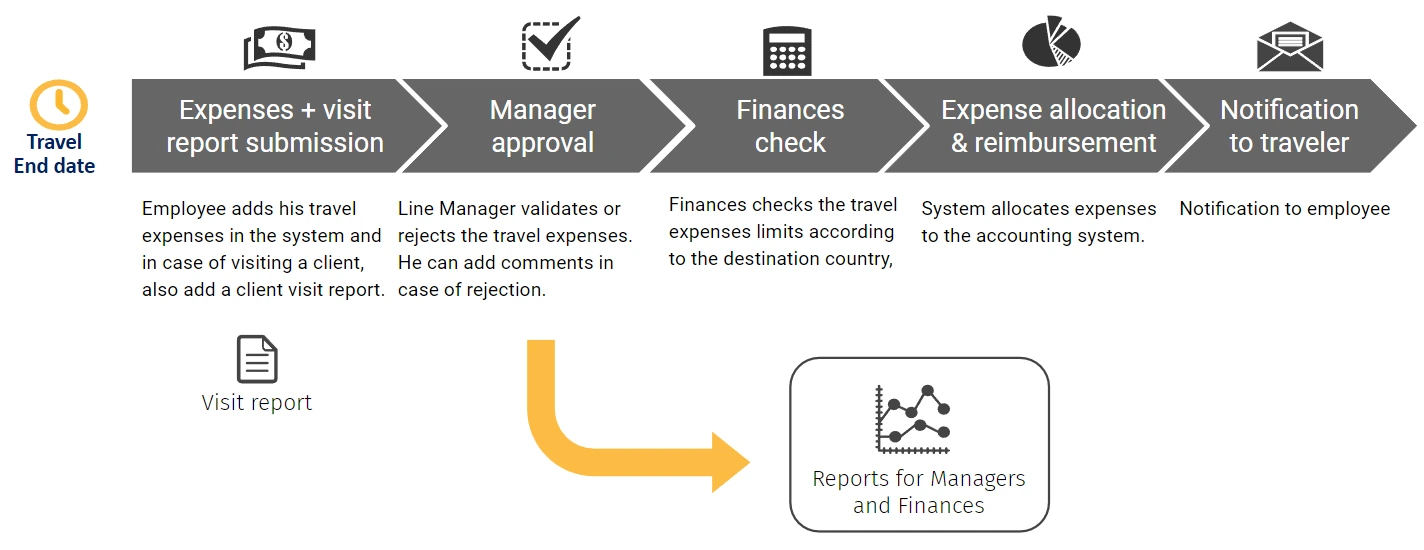
How automation improves travel expense management
Every travel expense claim follows the same verified path — receipts captured digitally, reports generated automatically, policy enforced at submission, approved without delay, and reimbursed on time. Better for employees, lighter for finance.
Automated expense reporting & receipt digitisation
BPA solutions capture expense data electronically through mobile apps or portals — with IDP and OCR technology scanning receipts and extracting amounts, dates, vendors, and categories automatically. Expense reports are generated automatically from the captured data, eliminating manual spreadsheet completion and the risk of lost paper receipts.
Automated policy compliance checks
Travel expense policy rules — per diem limits, eligible categories, required documentation, maximum spend thresholds — are enforced automatically at the point of submission. Expenses that violate policy are flagged immediately and returned to the employee with a clear explanation, ensuring compliance before the report ever reaches the approver.
Automated approval workflows & notifications
Validated expense reports are routed automatically to the designated approver based on predefined rules — department, expense type, and amount. Employees and approvers receive instant notifications at each stage. Escalation is triggered automatically if a response is not received within the required timeframe, preventing bottlenecks in the approval chain.
Accounting system integration
Approved travel expense data is synchronised automatically with accounting software — eliminating the manual transfer of data between the expense management system and the general ledger. Reimbursement calculations are automated, expense categories mapped correctly to account codes, and financial records updated without any manual intervention from the finance team.
Payroll integration & timely reimbursement
Approved reimbursements are integrated automatically with payroll systems — ensuring employees are paid through their normal payroll cycle without separate manual payment processing. Reimbursement timelines become predictable and consistent, improving employee satisfaction and eliminating the administrative overhead of managing travel reimbursements as a separate payment stream.
Real-time reporting & spend visibility
Finance teams gain real-time visibility into travel spend by employee, department, cost centre, and trip — with automated reports on expense volumes, policy exceptions, and reimbursement status. Every submission, approval, and payment is logged automatically, providing a complete audit trail for compliance review or internal analysis at any time.
Based on industry benchmarks for finance process automation. Actual results vary by organisation.
Other finance automation use cases
Ready to transform your operations?
Schedule a free consultation with our automation specialists.
We’ll analyze your current processes and show you exactly where automation can make the biggest impact.
No commitment. No generic demos. Just a real conversation about your operation.
FREE BPA CONSULTATION
Find out where automation can make the biggest impact on your operations
In a free 30-minute session, one of our certified BPA consultants will analyse your current back-office workflows and show you exactly where automation can reduce costs, eliminate manual effort, and strengthen compliance — with no commitment and no generic demos.