
Client invoicing automation
Invoices out faster. Payments tracked automatically. Cash flow protected.
Client invoicing is the financial pulse of your business — but managed manually, it means delayed invoice generation, inconsistent formatting, missed follow-ups on overdue payments, and hours spent on reconciliation. Automated, it becomes a seamless end-to-end workflow: from invoice creation to delivery, payment tracking, and account reconciliation — with no manual effort and no revenue lost to process gaps.
Manual vs automated client invoicing
Most organisations still generate invoices manually, track payments in spreadsheets, and chase overdue accounts by email — creating delays, errors, and unnecessary cash flow pressure.
Without automation
What the manual process typically looks like
- Invoices created manually from templates — prone to formatting errors and missing information
- Review and approval done by email — slow, with no centralised tracking of approval status
- Invoices sent manually with no automated delivery confirmation or read receipt
- Payment status tracked in spreadsheets — overdue accounts often missed until cash flow is already impacted
- Payment reminders sent manually — inconsistent timing and tone, depending on who does it
- Reconciliation performed manually at month-end — time-consuming and prone to discrepancies
With automation
What changes when you automate
- Invoices generated automatically with consistent formatting, correct data, and applicable taxes
- Review and approval routed automatically to the right stakeholders — with status tracked in real time
- Invoices delivered electronically with automated delivery confirmation and receipt tracking
- Payment status monitored automatically — overdue accounts flagged and escalated without manual checks
- Payment reminders sent automatically at predefined intervals — consistent, timely, and professional
- Account reconciliation performed automatically — discrepancies flagged and resolved without manual effort
Exclusive content
Access the full use case
Fill in the form to unlock this resource — no spam, only content relevant to your operations.
Client invoicing automation
Invoices out faster. Payments tracked automatically. Cash flow protected.
Client invoicing is the financial pulse of your business — but managed manually, it means delayed invoice generation, inconsistent formatting, missed follow-ups on overdue payments, and hours spent on reconciliation. Automated, it becomes a seamless end-to-end workflow: from invoice creation to delivery, payment tracking, and account reconciliation — with no manual effort and no revenue lost to process gaps.
Manual vs automated client invoicing
Most organisations still generate invoices manually, track payments in spreadsheets, and chase overdue accounts by email — creating delays, errors, and unnecessary cash flow pressure.
Without automation
What the manual process typically looks like
- Invoices created manually from templates — prone to formatting errors and missing information
- Review and approval done by email — slow, with no centralised tracking of approval status
- Invoices sent manually with no automated delivery confirmation or read receipt
- Payment status tracked in spreadsheets — overdue accounts often missed until cash flow is already impacted
- Payment reminders sent manually — inconsistent timing and tone, depending on who does it
- Reconciliation performed manually at month-end — time-consuming and prone to discrepancies
With automation
What changes when you automate
- Invoices generated automatically with consistent formatting, correct data, and applicable taxes
- Review and approval routed automatically to the right stakeholders — with status tracked in real time
- Invoices delivered electronically with automated delivery confirmation and receipt tracking
- Payment status monitored automatically — overdue accounts flagged and escalated without manual checks
- Payment reminders sent automatically at predefined intervals — consistent, timely, and professional
- Account reconciliation performed automatically — discrepancies flagged and resolved without manual effort
What client invoicing involves
Client invoicing is the process of billing clients for services rendered or products sold. It encompasses generating invoices, reviewing and approving them for accuracy, delivering them to clients, tracking payment status, following up on overdue accounts, and reconciling payments against issued invoices. Effective invoicing is fundamental to maintaining healthy cash flow, ensuring timely payments, and sustaining positive client relationships.
Each step of the invoicing cycle — from the initial generation of the invoice to the final reconciliation of the client account — requires accuracy, consistency, and timely execution. Done manually, even small inefficiencies accumulate into significant cash flow delays and administrative overhead. Automated, the entire cycle runs continuously and accurately without requiring staff intervention at each stage.
The client invoicing workflow
From invoice generation to account reconciliation — every step of the process, mapped end to end.
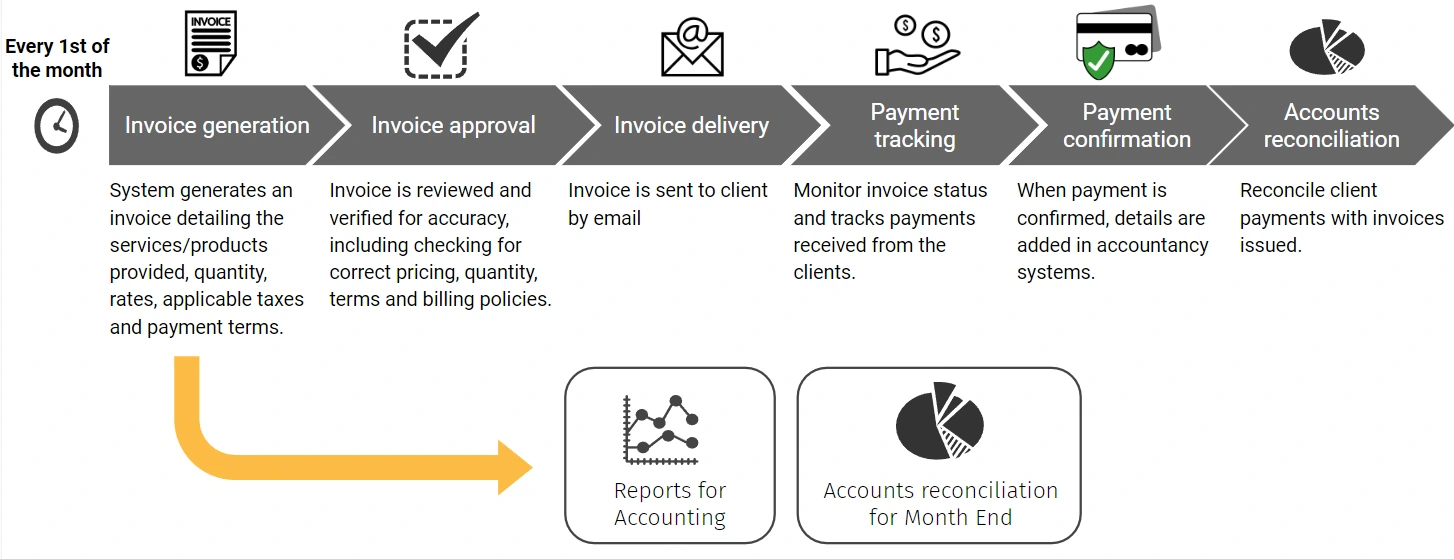
How automation improves the client invoicing process
Every invoice follows the same verified cycle — generated accurately, approved quickly, delivered on time, tracked automatically, and reconciled without manual effort.
Automated invoice generation & distribution
BPA solutions generate invoices automatically based on service records, contract terms, or billing cycles — ensuring consistent formatting, correct data, applicable taxes, and payment terms across every invoice. Distribution via email or electronic billing platforms is triggered automatically, eliminating manual creation and sending.
Automated review & approval routing
Invoices are routed automatically to the appropriate stakeholders for review and sign-off based on predefined rules — project manager, department head, or finance officer. Approval status is tracked in real time, with escalation triggered automatically if a review deadline is missed.
Electronic delivery & receipt confirmation
Approved invoices are delivered electronically with automated delivery confirmation and read receipts. Integration with electronic billing platforms ensures that invoices reach the client through their preferred channel — with every delivery event logged automatically in the system.
Automated payment tracking & overdue alerts
Payment status is monitored automatically in real time — providing full visibility into which invoices are paid, pending, or overdue. Overdue accounts are flagged automatically and escalated based on predefined thresholds, eliminating the need for manual checks and ensuring no outstanding payment slips through unnoticed.
Automated payment reminders & client notifications
Payment reminders are sent automatically to clients at predefined intervals — for upcoming due dates, overdue invoices, and payment confirmations. Consistent, professional communication is maintained without any manual drafting or follow-up effort from the finance team.
Automated reconciliation & reporting
Client payments are reconciled against issued invoices automatically — discrepancies identified and flagged for resolution without manual cross-referencing. Customised reports on invoice status, payment trends, and accounts receivable are generated automatically, giving finance teams real-time insight into billing performance.
Based on industry benchmarks for finance process automation. Actual results vary by organisation.
Other finance automation use cases
Ready to transform your operations?
Schedule a free consultation with our automation specialists.
We’ll analyze your current processes and show you exactly where automation can make the biggest impact.
No commitment. No generic demos. Just a real conversation about your operation.
FREE BPA CONSULTATION
Find out where automation can make the biggest impact on your operations
In a free 30-minute session, one of our certified BPA consultants will analyse your current back-office workflows and show you exactly where automation can reduce costs, eliminate manual effort, and strengthen compliance — with no commitment and no generic demos.