
Vacation approval automation
Requests submitted instantly. Approved without chasing. Calendars updated automatically.
Vacation approval is a high-frequency HR process that consumes disproportionate time when managed manually — employees submitting requests by email, managers approving informally, HR teams tracking balances in spreadsheets, and calendar updates made by hand. Automated, it becomes a seamless workflow: employees submit requests through a self-service portal, availability is checked automatically, manager approval is routed and tracked, leave balances are updated, and employee calendars are synchronised — all without manual intervention from HR.
Manual vs automated vacation approval
Most organisations still manage vacation requests through email submissions, informal manager approvals, and spreadsheet-based leave tracking — creating delays, balance errors, and scheduling conflicts that affect team productivity.
Without automation
What the manual process typically looks like
- Employees submit vacation requests by email — frequently lost, delayed, or acknowledged informally
- Manager reviews request manually — no visibility into team availability or other pending requests
- Leave balance checked manually in spreadsheets — errors common, balances frequently out of date
- Approval communicated by email — no formal confirmation, changes not always logged
- Calendar not updated until HR manually adds the entry — gaps and scheduling conflicts common
- Employees have no real-time visibility into their leave balance or request status
With automation
What changes when you automate
- Employees submit vacation requests through a self-service portal — available on desktop and mobile
- Team availability checked automatically — conflicts and overlapping requests flagged before submission reaches manager
- Leave balance validated automatically — insufficient balance flagged immediately at the point of submission
- Request routed automatically to line manager with full context — decision logged and employee notified instantly
- Approved vacation added automatically to the employee calendar and updated in the HR system
- Employees see real-time leave balance and request status through the self-service portal at all times
Exclusive content
Access the full use case
Fill in the form to unlock this resource — no spam, only content relevant to your operations.
Vacation approval automation
Requests submitted instantly. Approved without chasing. Calendars updated automatically.
Vacation approval is a high-frequency HR process that consumes disproportionate time when managed manually — employees submitting requests by email, managers approving informally, HR teams tracking balances in spreadsheets, and calendar updates made by hand. Automated, it becomes a seamless workflow: employees submit requests through a self-service portal, availability is checked automatically, manager approval is routed and tracked, leave balances are updated, and employee calendars are synchronised — all without manual intervention from HR.
Manual vs automated vacation approval
Most organisations still manage vacation requests through email submissions, informal manager approvals, and spreadsheet-based leave tracking — creating delays, balance errors, and scheduling conflicts that affect team productivity.
Without automation
What the manual process typically looks like
- Employees submit vacation requests by email — frequently lost, delayed, or acknowledged informally
- Manager reviews request manually — no visibility into team availability or other pending requests
- Leave balance checked manually in spreadsheets — errors common, balances frequently out of date
- Approval communicated by email — no formal confirmation, changes not always logged
- Calendar not updated until HR manually adds the entry — gaps and scheduling conflicts common
- Employees have no real-time visibility into their leave balance or request status
With automation
What changes when you automate
- Employees submit vacation requests through a self-service portal — available on desktop and mobile
- Team availability checked automatically — conflicts and overlapping requests flagged before submission reaches manager
- Leave balance validated automatically — insufficient balance flagged immediately at the point of submission
- Request routed automatically to line manager with full context — decision logged and employee notified instantly
- Approved vacation added automatically to the employee calendar and updated in the HR system
- Employees see real-time leave balance and request status through the self-service portal at all times
What vacation approval involves
Vacation approval is a vital HR process that enables employees to request time off for personal or recreational purposes while ensuring coordination and approval from their managers. It involves submitting vacation requests, reviewing employee availability, checking leave balances, obtaining manager approval, updating the employee calendar, and notifying the employee of the outcome. Effective vacation management balances employee wellbeing with operational continuity.
As a high-frequency process — each employee may generate multiple vacation requests per year — even small inefficiencies in the approval workflow accumulate into significant HR administrative overhead. Automated with BPA and a self-service portal, the process requires no HR intervention for standard requests, freeing the team to focus on more complex people matters.
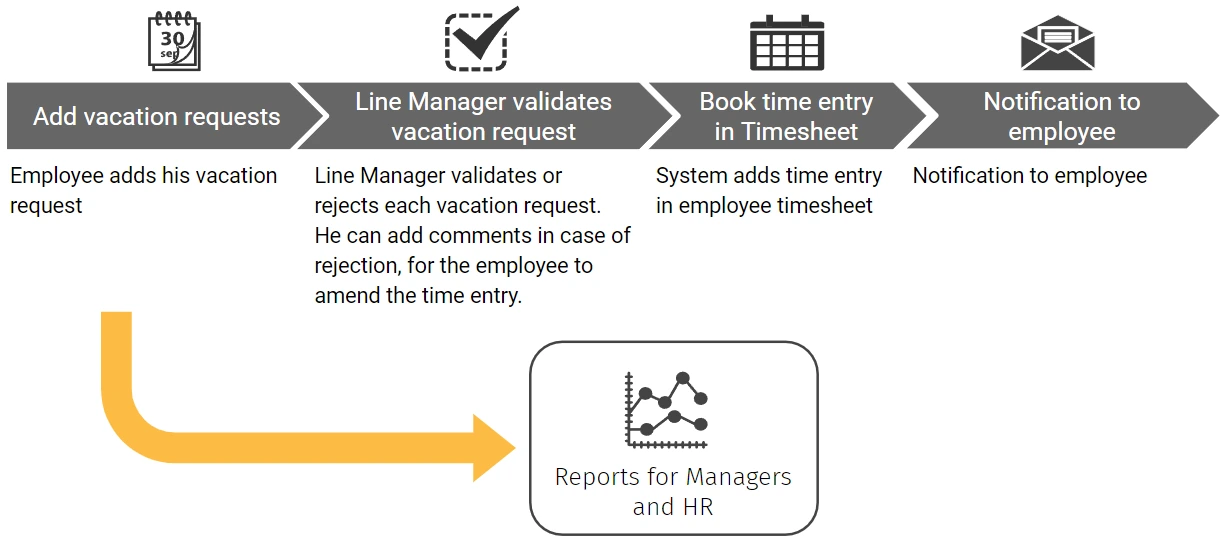
The vacation approval workflow
From request submission to calendar update — every step of the process, mapped end to end.
How automation improves the vacation approval process
Every request follows the same verified path — submitted through the self-service portal, balanced checked automatically, routed to the manager, approved and confirmed instantly, and reflected in the calendar without HR involvement.
Self-service vacation request portal
BPA enables employees to initiate vacation requests directly through a self-service portal or mobile app — specifying dates, duration, and any relevant notes without manual data entry by HR. The portal provides real-time visibility into the employee’s leave balance, remaining entitlement, and the status of any pending requests.
Automated availability & balance checks
At the point of submission, the system automatically checks the employee’s remaining leave balance and reviews team availability for the requested period — flagging conflicts with other approved absences or minimum staffing thresholds. Requests with insufficient balance or team coverage issues are flagged before reaching the manager.
Automated approval workflow & notifications
Validated requests are routed automatically to the line manager with full context — dates, duration, remaining balance, and team availability summary. The manager receives an instant notification and can approve or decline directly from the notification without logging into a separate system. The employee is notified of the outcome instantly.
Calendar & timesheet synchronisation
Approved vacation is automatically added to the employee’s calendar — creating a time entry that reflects the approved absence period and is visible to the team. The leave balance is updated automatically in the HR system, and a timesheet entry is created for payroll purposes without any manual HR data entry.
Employee notifications & transparency
Employees receive automated notifications at every stage — submission confirmation, approval or decline with reason, and final calendar confirmation. Real-time status visibility through the self-service portal eliminates the need for employees to chase HR or their manager for updates on their request.
Leave reporting & compliance
Vacation data is tracked automatically across the organisation — providing HR with real-time visibility into leave patterns, team absence levels, and entitlement utilisation. Compliance with mandatory rest periods and minimum leave entitlements is monitored automatically, with alerts triggered when policy thresholds are approached.
Based on industry benchmarks for HR process automation. Actual results vary by organisation.
Other HR automation use cases
Ready to transform your operations?
Schedule a free consultation with our automation specialists.
We’ll analyze your current processes and show you exactly where automation can make the biggest impact.
No commitment. No generic demos. Just a real conversation about your operation.
FREE BPA CONSULTATION
Find out where automation can make the biggest impact on your operations
In a free 30-minute session, one of our certified BPA consultants will analyse your current back-office workflows and show you exactly where automation can reduce costs, eliminate manual effort, and strengthen compliance — with no commitment and no generic demos.