
Timesheet approval automation
Hours tracked accurately. Approved without delays. Payroll processed right first time.
Timesheets are a fundamental tool of workforce management — but managed manually, they become a recurring source of errors, delays, and compliance risk. Employees submit late, managers approve inconsistently, data is re-keyed into payroll systems manually, and overtime is calculated by hand. Automated, timesheet management becomes a seamless workflow: digital submission through self-service portals, automated approval routing, overtime calculation, payroll integration, and project management tool synchronisation — all without manual data handling.
Manual vs automated timesheet management
Most organisations still manage timesheets through manual spreadsheet submissions, email-based approvals, and manual data transfer to payroll — creating errors, delays, and compliance risk at every step.
Without automation
What the manual process typically looks like
- Employees complete timesheets manually in spreadsheets — late submissions, forgotten hours, and data entry errors common
- Timesheets submitted by email — no centralised tracking, submissions frequently lost or delayed
- Manager approval done informally — no structured workflow, bottlenecks invisible until payroll deadline approaches
- Overtime calculated manually — labour law requirements applied inconsistently, compliance risk high
- Approved timesheet data re-keyed into payroll system — duplicate entry and transfer errors create payroll inaccuracies
- No real-time visibility into team hours — resource allocation decisions made without current data
With automation
What changes when you automate
- Employees submit hours digitally through self-service portals or mobile apps — validated automatically on submission
- Submission reminders sent automatically — late timesheets flagged before they affect payroll processing
- Approval workflow triggered automatically — routed to the correct manager with real-time status visibility
- Overtime calculated automatically — labour law rules applied consistently with compliance reports generated
- Approved timesheet data synchronised automatically with payroll — no manual transfer, no re-keying errors
- Real-time dashboards showing team hours, project allocations, and overtime trends — always current
Exclusive content
Access the full use case
Fill in the form to unlock this resource — no spam, only content relevant to your operations.
Timesheet approval automation
Hours tracked accurately. Approved without delays. Payroll processed right first time.
Timesheets are a fundamental tool of workforce management — but managed manually, they become a recurring source of errors, delays, and compliance risk. Employees submit late, managers approve inconsistently, data is re-keyed into payroll systems manually, and overtime is calculated by hand. Automated, timesheet management becomes a seamless workflow: digital submission through self-service portals, automated approval routing, overtime calculation, payroll integration, and project management tool synchronisation — all without manual data handling.
Manual vs automated timesheet management
Most organisations still manage timesheets through manual spreadsheet submissions, email-based approvals, and manual data transfer to payroll — creating errors, delays, and compliance risk at every step.
Without automation
What the manual process typically looks like
- Employees complete timesheets manually in spreadsheets — late submissions, forgotten hours, and data entry errors common
- Timesheets submitted by email — no centralised tracking, submissions frequently lost or delayed
- Manager approval done informally — no structured workflow, bottlenecks invisible until payroll deadline approaches
- Overtime calculated manually — labour law requirements applied inconsistently, compliance risk high
- Approved timesheet data re-keyed into payroll system — duplicate entry and transfer errors create payroll inaccuracies
- No real-time visibility into team hours — resource allocation decisions made without current data
With automation
What changes when you automate
- Employees submit hours digitally through self-service portals or mobile apps — validated automatically on submission
- Submission reminders sent automatically — late timesheets flagged before they affect payroll processing
- Approval workflow triggered automatically — routed to the correct manager with real-time status visibility
- Overtime calculated automatically — labour law rules applied consistently with compliance reports generated
- Approved timesheet data synchronised automatically with payroll — no manual transfer, no re-keying errors
- Real-time dashboards showing team hours, project allocations, and overtime trends — always current
What timesheet management involves
Timesheets are essential tools used by organisations to record and track the hours worked by employees on various tasks, projects, or assignments. They serve as a critical component of workforce management, enabling managers to monitor productivity, allocate resources effectively, and ensure compliance with labour regulations and payroll requirements. The timesheet process spans time entry, review and approval, overtime calculation, payroll integration, and reporting.
The accuracy and timeliness of timesheet data directly affect payroll correctness, project cost tracking, and compliance with labour laws. Manual processes introduce errors at every stage — from the original entry through to payroll transfer. Automated with BPA and self-service portals, the process becomes accurate, timely, and fully integrated with the systems that depend on it.
The timesheet approval workflow
From time entry to payroll integration — every step of the process, mapped end to end.
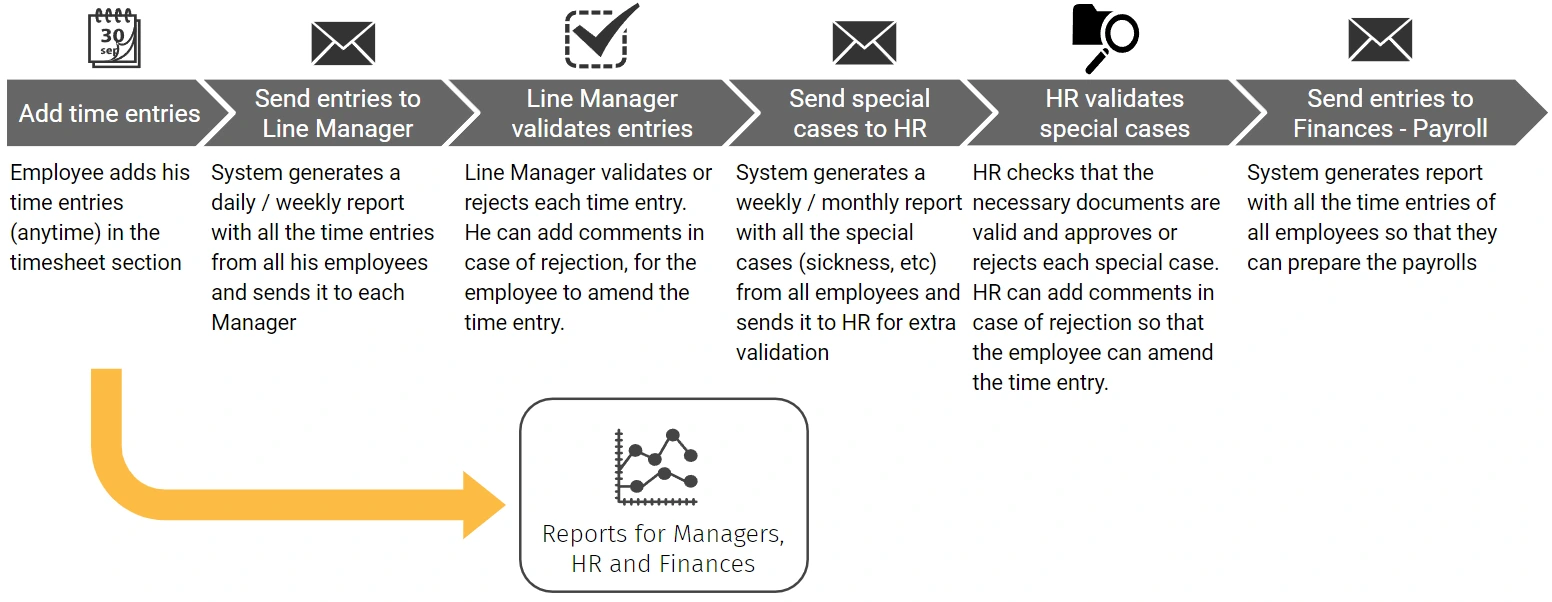
How automation improves the timesheet management process
Every timesheet follows the same verified path — submitted digitally, validated automatically, approved through a structured workflow, overtime calculated correctly, and integrated with payroll without manual data transfer.
Employee self-service portals
BPA provides employees with access to self-service portals or mobile apps where they can view, manage, and submit their timesheets digitally. Time entries are validated automatically on submission — flagging missing hours, inconsistencies, or anomalies before the timesheet reaches the manager for review.
Automated time tracking & submission reminders
BPA automates the capture of work hours through digital clock-in/out systems, mobile apps, or project management tool integrations — eliminating manual time entry and reducing the risk of errors and omissions. Submission reminders are sent automatically to employees who have not submitted by the required deadline.
Automated approval workflows
Submitted timesheets are routed automatically to the correct manager for review and approval based on predefined hierarchies. Approvers are notified instantly, and escalation is triggered automatically if a response is not received within the required timeframe — preventing approval bottlenecks from delaying payroll processing.
Overtime calculation & compliance
Overtime hours are calculated automatically based on approved timesheets — applying jurisdictional overtime rules, rates, and thresholds consistently across all employees. Compliance reports are generated automatically for payroll processing and regulatory audit, eliminating the manual calculation errors that create both payroll inaccuracies and legal exposure.
Payroll integration
Approved timesheet data is synchronised automatically with payroll systems — eliminating manual data transfer and the re-keying errors that cause payroll inaccuracies. Project cost codes are mapped correctly, payroll calculations are triggered without manual intervention, and the full timesheet-to-payroll trail is maintained automatically for audit purposes.
Project management tool integration
BPA integrates timesheet systems with project management platforms — automatically populating time entries from project tasks, milestones, and assignments. Real-time dashboards show team hours, project allocations, and overtime trends, enabling managers to make resource decisions based on current data rather than stale manual reports.
Based on industry benchmarks for HR process automation. Actual results vary by organisation.
Other HR automation use cases
Ready to transform your operations?
Schedule a free consultation with our automation specialists.
We’ll analyze your current processes and show you exactly where automation can make the biggest impact.
No commitment. No generic demos. Just a real conversation about your operation.
FREE BPA CONSULTATION
Find out where automation can make the biggest impact on your operations
In a free 30-minute session, one of our certified BPA consultants will analyse your current back-office workflows and show you exactly where automation can reduce costs, eliminate manual effort, and strengthen compliance — with no commitment and no generic demos.